Every connection you make, captured, researched, and organized in seconds.
An AI-powered CRM that lives inside Claude, the AI assistant from Anthropic. Snap a badge or just say who you met, at any conference, trade show, or networking event, and it handles the rest. No new app, no typing.
$20 free credit · No new app to download · No credit card required
You meet a hundred people. You remember three.
Stacks of business cards, a sea of name badges, a dozen great conversations, at the conference, the chamber mixer, the industry dinner. By the time you get home, most of them are already gone.
A blur by dinner
You meet more people before lunch than you can place by dinner.
Capturing is a chore
Scanning badges and typing names, head-down on your phone instead of present with the person in front of you.
The follow-up dies
The cards pile up in a drawer, and the warmest leads of the year go cold.
ConferenceCRM in 90 seconds.
The problem, the fix, and what you walk away with. If you are new here, start with this.
Just say it out loud.
Open Claude, talk to it like a teammate, and your CRM fills itself in by voice. No new app to download, no typing.
Open Claude. Snap the badge. Done.
A CRM that doesn’t feel like one. No new app, no forms, no pile of business cards waiting in a drawer. Just snap, ask, and it’s handled before you’ve left the conversation. You walk out with your whole network captured and researched, while everyone else is still collecting cards.
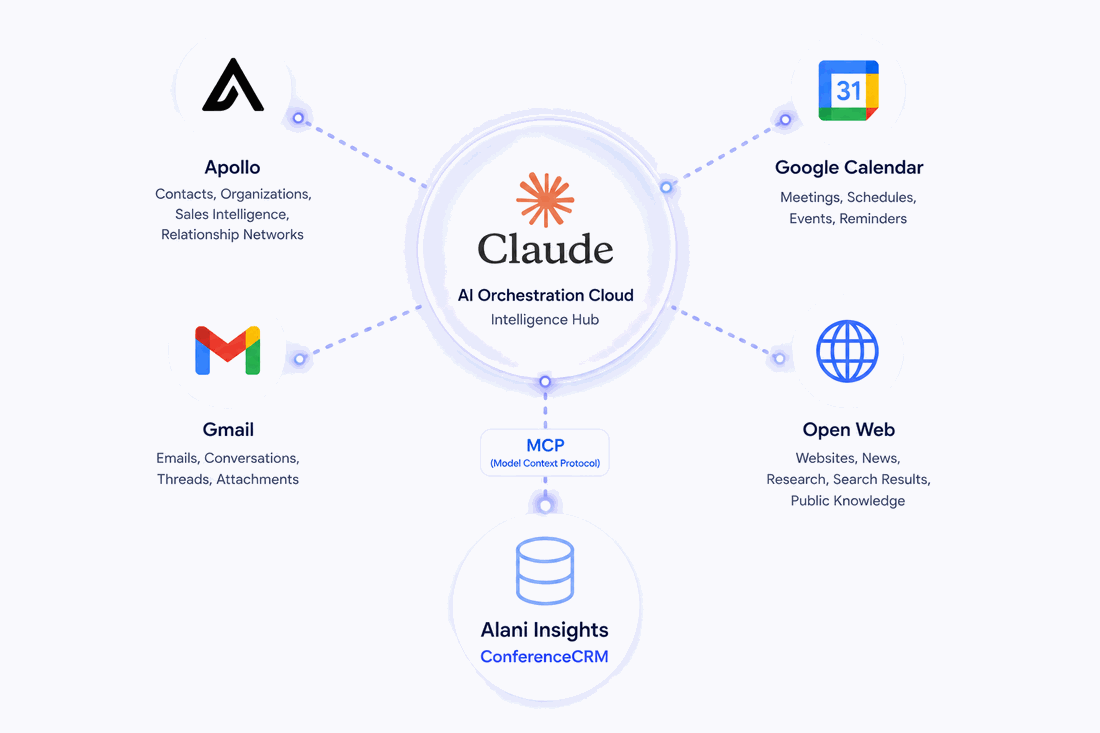
- Nothing to download. It runs right inside Claude.
- One photo, done. No typing, no scanning apps, no LinkedIn requests.
- Enriched before you leave. Their background, company, and role are pulled in automatically.
Turn a handshake into a relationship.
It keeps every contact and the context around them, and because it lives in Claude, it connects to the tools you already use, all by voice.
Connect
Claude researches every contact you meet, pulling their background, company, and role from the web and the data tools you already use. You reconnect already knowing who they are and what they care about.
Capture
Snap a badge or just say, “I just met Sara, she runs ops at a fintech.” Claude saves her with the context around her: your notes, where you met, and why she matters.
Cultivate
Set reminders and activities, schedule the meeting right in the chat, and have Claude draft the follow-up, all in context, all by voice.
From founders who work the room
“I named my CRM Cleo and just talk to her in Claude. I meet hundreds of buyers at every trade show, and now not one slips through the cracks. Every venue she helps me follow up and sign means more bars, restaurants, and events protected from drink spiking.”

“My ConferenceCRM was super helpful at my conference booth. I could quickly note exactly what my best leads wanted, then send a follow-up detailed and personable enough to stand out from every other exhibitor’s generic email. As someone with a really bad memory, that was especially useful.”

Keep it. Capture the chaos here first.
Networking events are run-and-gun, a conference floor, a chamber mixer, a summit dinner, dozens of quick exchanges with no time for data entry. Catch every connection here in the moment, so your real pipeline never fills up with half-formed leads. When you’re back and you know who matters, push the keepers into the CRM you already use, like Salesforce or HubSpot. Just ask Claude to sync them, no exporting, no copy and paste.
Start free. Then $49 a month.
Get $20 in credit, on us, to try the full platform. No credit card to start. When you are ready, it is a flat $49 a month for your whole team, not per user.
On us, to try the whole thing. No credit card required.
- Capture contacts by voice or photo
- Automatic research on everyone you meet
- Notes, reminders, and follow-ups drafted for you
- Works right inside Claude, nothing to install
Flat rate for your whole team. Not per user.
Add as many team members as you want and share one pool of usage across everyone.
- Unlimited team members
- Shared usage across your whole team
- Everything from your free credit, ongoing
- Sync to the CRM you already use
No credit card required to start.
Set it up once. Then just talk.
Your CRM lives inside Claude, so there is nothing to install. You connect it once, in about two minutes, then you just talk to it from then on. New to Claude? You are exactly who we built this for. The steps below walk you through every click, and it is mostly just pressing Next.
- 1Go to claude.ai and sign in.
- 2Click the Customize icon (the briefcase / toolbox).
- 3Open Skills & Connectors, then Connectors.
- 4Click +, then Add custom connector. This is how Claude plugs into an outside tool.
- 5Name it Alani Insights and paste in this address:
https://mcp.alaniinsights.com - 6Click Save and sign in to connect. You’ll land back in Claude.
- 7Allow it to add and update your contacts. That is what lets it save people for you.
On your first chat, just say “Save to Alani Insights.” Claude sets everything up, and your CRM is ready to use.
Claude’s interface updates often, so button names and locations may shift slightly over time.
Notes from the floor
Playbooks, comparisons, and field notes on capturing connections and turning every networking event into real pipeline.
The best conference lead capture tools in 2026
Six tools ranked and compared, verified from each company’s own docs: what each does, what it cannot, and who it is for.
Read →How to follow up after a conference
The five-step system that fixes capture and follow-up, with email templates, so your next event produces pipeline.
Read →What is a Claude MCP tool?
MCP turns Claude from a chat assistant into something that can act. What it is, how to set one up, and why it matters.
Read →Stop losing the leads you already earned.
Add ConferenceCRM to Claude in under a minute and turn every handshake into real pipeline. We’ll spot you $20 of credit to start, no card required.
No new app to download · No credit card required